• Members
  • Join
  • Day Pass
Fitness Formula Clubs
  • Club Locations
    • East Lakeview
    • Elmhurst
    • Gold Coast
    • Lincoln Park
    • Oak Park
    • Old Town
    • Park Ridge
    • South Loop
    • Union Station
    • West Loop
  • Fitness & Programming
    • Group Fitness
    • InBody Composition Analysis
    • Muscle Activation Techniques®
    • Personal Training
    • Pilates
    • Explore HYROX
    • The Faction
    • Club Programming
  • Wellness & Spa
    • Medical Affiliations
    • Physical Therapy
    • Recovery Lounge
    • Safety
    • Spa
  • Recreation
    • Outdoor Amenities
    • Chicago Pools & Aquatics Programs at FFC
    • Climbing Wall
    • Pickleball
    • Basketball
  • Nutrition/Registered Dietitian
  • Corporate Wellness
  • Kids’ Club
  • Contact Us
  • Blog
  • Schedule A Tour
  • Become a Member
  • Members
  • Medical Affiliations
  • Menu Menu
Tips

How To: Use the MyFitnessPal App to Lose More Weight

So you’ve made the decision to track your nutrition. Congratulations! Meal tracking can improve one’s diet, promote more mindful eating behaviors, provide lots of new information for your benefit as well as for your doctor or dietitian and ultimately, lose more weight! MyFitnessPal (a popular app available for both iPhone and Android) is an easy and effective way to track what you eat.

Getting Started
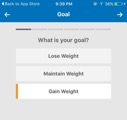
After downloading the app and signing up using your email or Facebook, you are encouraged to provide basic information such as your age, weight and activity level.

This will help you establish a goal (such as losing, maintaining, or gaining weight) as well as the rate at which the weight change will occur. These factors will determine the app’s recommendation for your daily caloric intake.


Related: want some other apps or resources for tracking nutrition? Check out this post!

Track Your Diet
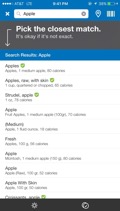
Now you can start tracking! Using the diary page, you can input new information by pressing the blue + button on the bottom of the screen or the “add food” button under specific meals. The + button allows for you to input food as well as other information like status with progress photos, water, exercise, and weight.

One of the most useful aspects of MyFitnessPal is their enormous database containing most food items that can be bought from stores. Your phone’s camera can also scan the barcode of almost any packaged food item and the database will usually have it stored! However, be careful to specify the number of servings you eat, as many packaged food items contain multiple servings.

As you track your meal through the day, the equation on your diary page will update to keep you informed on your progress. The more exercise you get in a given day, the more you will have to eat to compensate for those burned calories. Exercise can be factored into the equation automatically using your phone’s ability to count steps or compatible devices such as Apple Watch or Fitbit.

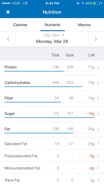
To see your breakdown of caloric intake per meal, nutrients and macros (carbs, fat, protein) click “Nutrition” while in the diary tab. Track your weight over time to further motivate yourself! You can also input other information like BMI and body fat %.

Related: want to supplement your meal tracking with a plan? Click here to register for a free 30-minute nutrition consultation with an FFC on-site registered dietitian!

5 Tips for Maximum Results

Use the “recent” food tab.

When inputting food in your MyFitnessPal diary, use the “recent” tab for foods you eat regularly. You can also group ingredients as a custom meal to use in the future. Over time, time spent tracking your meals should decrease significantly!

Say no to diets, just eat mindfully.
Studies show that people who subscribe to “fad diets” often do not succeed with their weight loss goals. At the end of the day, companies care most about making money by selling you products. Doing your research, tracking your diet, and eating more mindfully can be done without paying anyone (and is much cheaper, especially given that MyFitnessPal is free!)

Remember that everyone’s macros will be different.

Keep in mind that everyone is different –  different people will function best with different ratios of carbs and protein. Carefully monitor the way you feel and function after different meals – these experiences and results are uniquely yours!

Use the barcode scanner.

The barcode scanner is your friend! When I began to track my meals I was excited about the bar code scanner and the potential to track exactly what I ate. So for one day, I only ate food that came in packages I could scan. I cooked once that day but was sure to scan every ingredient using exact measurements. These rules dictated that I could not mindlessly eat a handful of chips or chug orange juice from the carton because everything had to be measured out precisely. I immediately learned about how to eat more mindfully.

Share the data!

The nutrition data you collect over time should be immensely helpful for your doctor, registered dietitian (did you know we have a full staff of RDs at FFC?), or other healthcare professional. Nutrition is one of the biggest indicators of overall health and it is currently very rare that patients have complete logs of their diets. If you are experiencing health problems potentially related to nutrition and your current health care professional is not knowledgeable about nutrition and primary prevention, find another who is.

The more you track, the more motivated you will be!

Post written by FFC contributor Andy Devries.
 

by Fitness Formula Clubs
Share this entry
  • Share on Facebook
  • Share on X
  • Share on WhatsApp
  • Share on Pinterest
  • Share on LinkedIn
  • Share by Mail
https://ffc.com/wp-content/uploads/2018/03/How-To-Use-MyFitnessPal-App-To-Lose-More-Weight-FFC.jpg 1000 1500 Fitness Formula Clubs https://ffc.com/images/Best-Gym.png Fitness Formula Clubs2018-03-07 17:28:512025-11-20 10:26:22How To: Use the MyFitnessPal App to Lose More Weight
You might also like
Best healthy airport food options to stay on track Best Healthy Food At The Airport to Stay On Track
Best registered dietitian-approved nutrition books for reference Top 10 Registered Dietitian-Approved Nutrition Books and Documentaries
How to have a better relationship with food - nutrition tips How to Have a Better Relationship With Food
FFC Personal Trainer using lat pulldown weight machine at the gym Use These Weight Machines At The Gym For A Total Body Workout
Everything You Ever Wanted to Know About a VO2 Max Test & Why You Should Get One Everything You Ever Wanted to Know About a VO2 Max Test & Why You Should Get One
Work life balance importance plus plans to help you find balance between responsibilities and your passions! Work Life Balance Importance: A Guide to Finding Balance & Pursuing Your Passions, Plus a Sample Plan
Back to all posts
The Best Gyms in Chicago

Corporate Headquarters

619 W Jackson Blvd
Chicago, IL 60661

(872) 348-3676

©FitnessFormulaClubs

EXPLORE

Home Join Clubs Group Fitness Training Wellness Shop Gift Cards Membership Freeze Membership Cancellation

ABOUT US

Company Kids Club Careers Press Get Certified Accessibility, Cookies & Privacy FAQ

FOLLOW

Instagram Youtube Facebook Linkedin
Scroll to top Scroll to top Scroll to top

This site uses cookies. By continuing to browse the site, you are agreeing to our use of cookies.

OK

Cookie and Privacy Settings


How we use cookies

We may request cookies to be set on your device. We use cookies to let us know when you visit our websites, how you interact with us, to enrich your user experience, and to customize your relationship with our website.

Click on the different category headings to find out more. You can also change some of your preferences. Note that blocking some types of cookies may impact your experience on our websites and the services we are able to offer.

Essential Website Cookies

These cookies are strictly necessary to provide you with services available through our website and to use some of its features.

Because these cookies are strictly necessary to deliver the website, refusing them will have impact how our site functions. You always can block or delete cookies by changing your browser settings and force blocking all cookies on this website. But this will always prompt you to accept/refuse cookies when revisiting our site.

We fully respect if you want to refuse cookies but to avoid asking you again and again kindly allow us to store a cookie for that. You are free to opt out any time or opt in for other cookies to get a better experience. If you refuse cookies we will remove all set cookies in our domain.

We provide you with a list of stored cookies on your computer in our domain so you can check what we stored. Due to security reasons we are not able to show or modify cookies from other domains. You can check these in your browser security settings.

Other external services

We also use different external services like Google Webfonts, Google Maps, and external Video providers. Since these providers may collect personal data like your IP address we allow you to block them here. Please be aware that this might heavily reduce the functionality and appearance of our site. Changes will take effect once you reload the page.

Google Webfont Settings:

Google Map Settings:

Google reCaptcha Settings:

Vimeo and Youtube video embeds:

Privacy Policy

You can read about our cookies and privacy settings in detail on our Privacy Policy Page.

Privacy Policy & Web Accessibility
Accept settingsHide notification only